


How to Hide Cables in Your Home Office Setup?
Last Updated: October 25, 2026
Quick Summary
To hide cables home office style, use under-desk cable trays, adhesive clips, and freestanding cable boxes to contain power strips and route cords along the desk back and underside. Plan your cable routes before mounting anything, label each cable, and choose organizers that fit your desk type and living situation.
- Under-desk trays, baskets, and freestanding boxes keep cables organized and out of sight without requiring permanent installation.
- Adhesive cable clips guide individual cords every 12-18 inches along planned routes and work on any smooth surface without tools.
- Power strips generate 8-12 cables each, so contain them in a dedicated box or organizer to prevent heat buildup and tangling.
- Cable sleeves bundle multiple cords into one neat line, and routing cables down the desk back keeps them completely hidden from view.
- Label both ends of each cable before final mounting, then inspect your setup every few months for frayed insulation or loose connections.
Table of Contents
- Why Cable Management Matters in Your Home Office
- Plan Your Desk Cable Management Before You Start
- How to Hide Cables Under a Desk with Cable Trays and Baskets
- Using Cable Clips for Desk Organization
- Organize Power Strips and Adapters with a Computer Cord Organizer
- Route and Bundle Cables Along Your Desk
- Safety and Maintenance Tips for Hidden Cables
- Start Your Cable-Free Home Office Today
- Frequently Asked Questions
Why Cable Management Matters in Your Home Office
A cluttered desk kills productivity. When cables tangle across your workspace, you waste time untangling them, you trip over power cords, and your home office looks chaotic instead of professional.
Cable management transforms your setup from frustrating to functional.
The good news: when you hide cables home office style, it doesn't require expensive solutions or professional installation.
Plan Your Desk Cable Management Before You Start
The biggest mistake people make is diving straight into hiding cables without understanding what they're working with. A short planning session prevents you from buying the wrong organizers or building a system that fights your daily workflow.
Step 1: Inventory every device and cable
Walk around your desk and write down each device, its power cable, and any data cables. Note which devices stay put (monitor, speakers, lamp) and which move (laptop, phone, tablet). Count the total number of cables and identify the thickest power bricks and the longest runs. This inventory is your shopping list and your routing map.
Step 2: Measure cable runs and outlet distance
Use a tape measure to record the distance from each device to your power strip, and from the power strip to the wall outlet. Add 6-12 inches of slack for adjustments. If you use a standing desk, measure the full height range and add slack for the highest position. Cables that are too short force awkward routing; cables that are too long create loops that sag and tangle.
Step 3: Choose a mounting method that fits your space
Your desk type and lease terms decide which solutions are viable:
- Solid wood or laminate desk, owned home: Under-desk screw-mounted trays and baskets are the most secure and can hold heavier power strips.
- Rental apartment or dorm: Favor adhesive-mounted trays, freestanding cable boxes, and removable hook-and-loop straps. Avoid screws and permanent adhesive that can damage surfaces.
- Glass desk: Adhesive clips and trays with gentle-removal adhesive work best; screw mounts can crack glass. Keep heavy power strips on the floor in a box rather than hanging from the glass.
Step 4: Plan the route before you stick anything down
Sketch a simple diagram: where cables enter the desk area, where they bundle, where they split to devices, and where they return to power. A single logical route is easier to maintain than a web of overlapping cords. Decide where your cable tray, clips, and box will sit before you remove any adhesive backing.
Step 5: Label and test
Before final mounting, label both ends of each cable with tape or a label maker. Plug everything in, test each device, then adjust slack and clip placement.
When you're ready to shop for organizers, Tech Accessories and Office & Stationery have everything your plan calls for.
Different desk types and living situations call for different cable management approaches.
| Desk Type | Best Method | Key Consideration |
|---|---|---|
| Solid wood or laminate, owned | Screw-mounted trays and baskets | Most secure for heavier power strips |
| Rental apartment or dorm | Adhesive clips, freestanding boxes | Avoid permanent damage to surfaces |
| Glass desk | Adhesive clips and gentle-removal trays | Screw mounts can crack glass |
| Standing desk | Under-desk tray on moving surface | Must accommodate full height range |
| Wall-mounted or floating desk | Wall raceways and floor box | Keeps desk surface completely clean |
How to Hide Cables Under a Desk with Cable Trays and Baskets
The space under your desk is prime real estate for cable management. This is where most of your cables naturally live anyway, so why not organize them there?
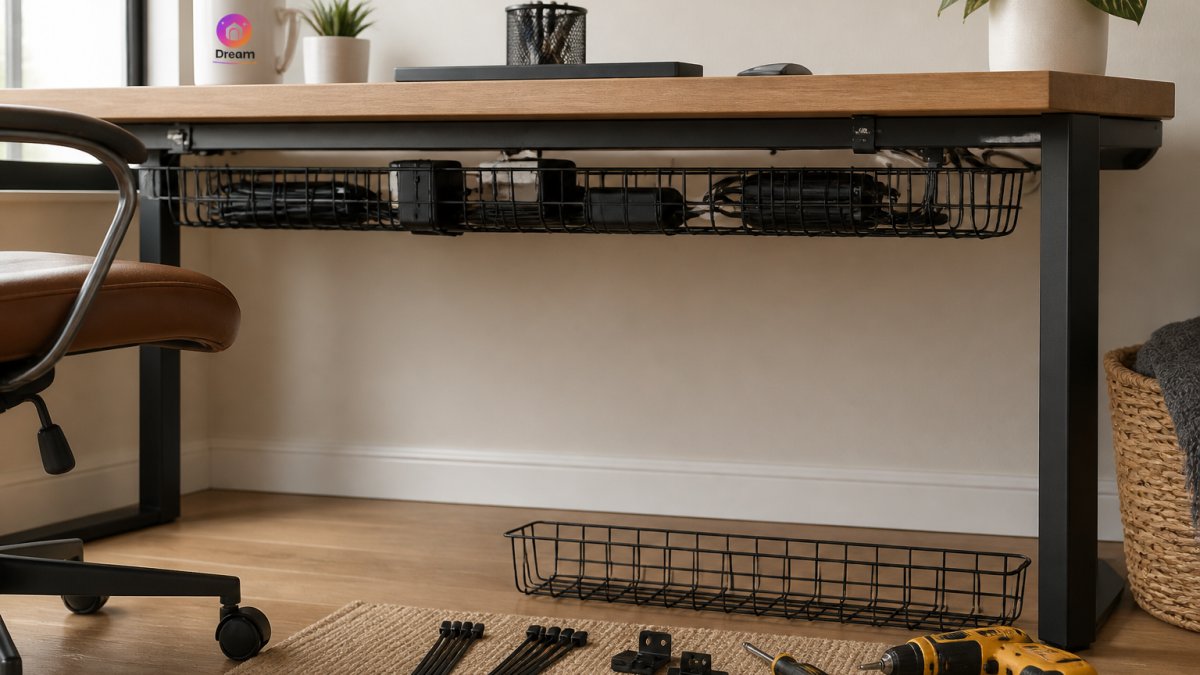
Under-desk cable trays
An under-desk cable tray mounts to the underside of your desk and holds cables in a contained channel. This keeps cords off the floor, organized in one place, and hidden from view.
Cable trays work best when:
- Your desk is solid enough to support the weight (most are)
- You have regular access to adjust cables
- You want a semi-permanent solution that doesn't require drilling
The tray sits just out of sight but remains easy to reach if you need to add, remove, or adjust a cable.
Cable baskets and boxes
A cable basket is a mesh or solid container that sits under your desk and holds cables, power strips, and adapters. Unlike a tray, baskets have sides and a bottom, so nothing falls through or gets lost.
Cable baskets offer flexibility:
- Move them easily if you rearrange your desk
- Access everything quickly without crawling underneath
- Hide power bricks and adapters completely
A freestanding cable box is perfect if you want zero installation hassle. Check Home Essentials for cable storage solutions that fit your space.
Baskets and boxes work especially well for:
- Rental apartments where you can't install permanent fixtures
- Desks where mounting a tray isn't practical
- Setups with many power adapters and bricks
Using Cable Clips for Desk Organization
Cable clips are small, affordable heroes of desk organization.
Adhesive cable clips stick directly to your desk, walls, or the underside of surfaces. They're perfect because:
- They require no drilling or tools
- They're removable without damaging surfaces
- They work on almost any smooth surface
The key to using clips effectively is planning your cable route before you stick them down.
For a standing desk, clips become even more important. As your desk moves up and down, cables need slack to move with it.
Pro tip: Label your cables before clipping them in place. A desk organizer keeps your workspace tidy while you manage cables and other office supplies.
Organize Power Strips and Adapters with a Computer Cord Organizer
Power strips and adapters are the real cable clutter culprits. One power strip can generate 8-12 cables, and adapters multiply that chaos.
Cable & Wire Storage Box | Multi-Functional Power Strip Organizer →
The solution is containment. A dedicated power strip organizer keeps everything in one spot where it belongs.

Here's why this matters:
- Power strips create heat when cables are bunched around them
- Tangled cables around adapters can damage the connections
- Hidden adapters are safer, no tripping hazards or accidental unplugging
A freestanding cable box solves this by housing your power strip inside a plastic container. Browse Home Essentials for options that fit your setup.
Route and Bundle Cables Along Your Desk
Once you've contained your power strip and planned your cable paths, it's time to route cables strategically.
Cable sleeves and wraps
A cable sleeve bundles multiple cables together into a single, neat line. Instead of seeing five separate cords running across your desk, you see one organized bundle.
Cable sleeves come in fabric, plastic, or mesh. They're:
- Easy to apply (just wrap and secure)
- Adjustable as your setup changes
- Available in different colors to match your desk
Wraps work best for cables that run the same direction, like all the cables going from your monitor to your power source. Group them, wrap them, and suddenly your cable management looks intentional.
Routing along the desk back and underside
The back of your desk is invisible when you're working. Use this to your advantage.
Run cables down the back of your desk instead of across the front. A desk mat provides a clean surface while helping conceal and organize cables underneath. This means:
- Cables stay completely hidden from view
- You have more open desk space for work
- Cable routes are intuitive and easy to remember
For the underside, use adhesive clips or a cable tray to guide cables from your devices to your power source.
The goal is a single, logical cable route. Cables should enter your desk area in one organized bundle, distribute to individual devices, and return to power in a neat path.
Safety and Maintenance Tips for Hidden Cables
Hiding cables is great for aesthetics, but safety comes first. A tidy setup should also be a safe one, especially when power strips, adapters, and bundles are tucked out of sight.
Avoid overloading power strips and circuits
Every power strip has a maximum load rating printed on it or its packaging. Add up the wattage of the devices you plan to plug in and keep the total comfortably below that rating. High-draw items like space heaters, laser printers, and some desktop PCs should plug directly into a wall outlet rather than a daisy-chained strip.
Prevent heat buildup in cable boxes and bundles
Enclosed cable boxes and tightly wrapped sleeves can trap heat. Choose a box with ventilation slots or leave the lid slightly open if your power strip runs warm. Avoid bundling power cables so tightly that they cannot shed heat, and keep power bricks spaced apart rather than stacked. If a box or bundle feels hot to the touch after a few hours of use, redistribute the contents or switch to a more open tray.
Protect cables from pinch points and strain
Route cables away from moving parts, use clips to keep them off the floor, and avoid bending power cords sharply at the plug. Leave a gentle slack loop at each connection so plugs are not pulled tight. For standing desks, verify through the full height range that no cable is stretched, pinched, or snagged.
Keep cables dry and away from heat sources
Route cables away from radiators, space heaters, and areas where drinks are likely to spill. Moisture and heat both degrade insulation over time.
Build a simple maintenance routine
Take five minutes every few months to inspect your setup:
- Check for frayed insulation, cracked plugs, or loose connections.
- Feel power strips and boxes for unusual warmth.
- Re-tighten or replace hook-and-loop straps that have loosened.
A freestanding cable box makes these checks easier because you can lift the lid and inspect the power strip without crawling under the desk. First-time customers at Dream Deal Shop get 10% off their first order, which helps when you're stocking up on organizers, straps, and labels for a safe, maintainable setup.
Start Your Cable-Free Home Office Today
A clean, organized desk isn't a luxury, it's the foundation of a productive home office, and learning how to hide cables home office style is the first step.
The hardest part is starting. Pick one area of your desk and begin there. Maybe it's hiding the power strip, or bundling cables along the back of your desk.
At Dream Deal Shop, we stock the tools that make this easy: cable organizers, desk organizers, and storage solutions designed for real homes. First-time customers get 10% off their first order, shop today and transform your home office.
Frequently Asked Questions
What's the safest way to hide cables in a home office?
Keep cables organized and untangled to prevent overheating. Avoid blocking ventilation around power strips and adapters. Use cable management tools like trays, clips, and sleeves to prevent cords from pinching or getting damaged. Never cover cables with rugs or furniture that could trap heat. Check cables regularly for wear, and ensure your power strip isn't overloaded with too many devices.
How do I hide cables under a desk without damaging my rental?
Use removable solutions: adhesive cable clips (which leave no marks when removed carefully), reusable hook-and-loop straps, and freestanding cable boxes that need no installation. Avoid drilling, screwing, or permanently mounting anything. Cable sleeves and wraps also work well and pack away easily when you move.
Can I use a cable box to organize my power strip and adapters?
Yes. A cable box or power strip organizer keeps your power strip, adapters, and excess cables contained in one freestanding unit. Look for designs with easy outlet access so you can still plug devices in without opening the box. This keeps clutter off your desk and floor while maintaining airflow around your equipment.
How do cable clips for desk setups help with organization?
Cable clips grip individual cords and attach to your desk, wall, or baseboard, routing each cable exactly where you need it. Adhesive clips work well for non-permanent solutions and require no tools. They prevent cables from tangling, make it easy to identify which cord goes where, and keep everything in place even if your desk gets bumped.
A functional home office starts with a simple decision: take control of your cables today. The time you save and the stress you eliminate will make it worth every minute.
