

Best Tech Accessories for Productivity in 2026
Table of Contents
- Quick Comparison: Top Picks at a Glance
- How We Chose the Best Tech Accessories for Productivity
- Best Productivity Gadgets Under $50 That Deliver Real Value
- Ergonomic Desk Accessories That Reduce Strain and Boost Output
- Tech Gadgets for Focus and Concentration: Cut the Distractions
- Expand Your Screen Real Estate Without a Second Desk
- How to Build a Productivity Ecosystem That Works for You
- Conclusion
- Frequently Asked Questions
Last Updated: September 16, 2026
Quick Comparison: Top Picks at a Glance
Choosing the best tech accessories for productivity in 2026 comes down to one problem: your desk, screen, and posture are fighting each other. The accessories that stick around fix a specific friction point, not the ones that look good in a listing photo.
Here's the short version before we get into the detail:
| Accessory | Price | Best For | Why It Earns Its Spot |
|---|---|---|---|
| Foldable Laptop Stand | $26.99 | Travel and hybrid work | Folds flat, lifts screen to eye level |
| Webcam Cover Slider | $14.99 | Privacy on any device | Ultra-thin, no sticky residue |
| Clear Trifold iPad Case | $17.99 | Tablet users on the move | Built-in pen holder and stand |
| 360° Rotation Laptop Stand | $90.99 | Fixed desk setups | Full rotation, heat-dissipating metal |
| PU Leather Desk Mat with Wrist Rest | $68.99 | Long typing sessions | Cushioned support across the full desk |
| Cable & Wire Storage Box | $43.99 | Taming power strip clutter | Hides cables, no assembly |
| Wooden Desk Organiser | $67.99 | Stationery and small tools | Large capacity with a drawer |
| No Drill Desktop Pegboard Rack | $135.99 | Gaming and creator desks | Holds controllers, headphones, more |
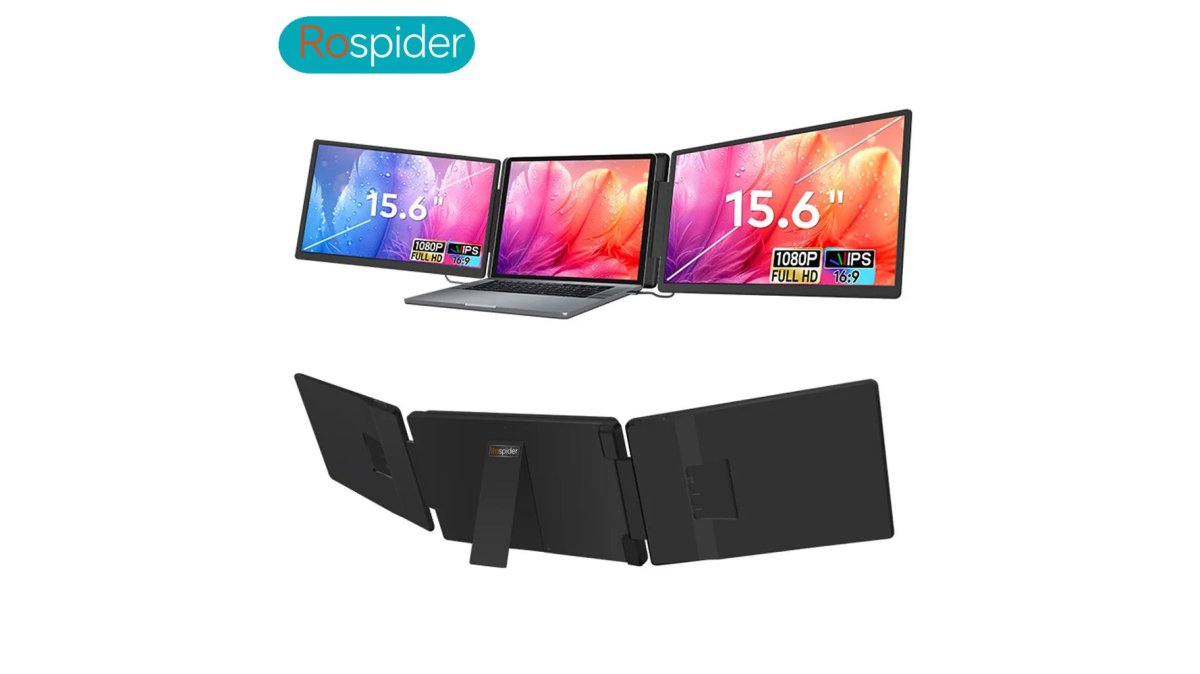
| Rospider Dual Screen Extender | $563.99 | Laptop-only workers | Adds two screens with one cable |
| Baseus 10-in-1 USB-C Hub | $77.99 | Port-starved laptops | Dual HDMI, 100W PD, Ethernet |
How We Chose the Best Tech Accessories for Productivity
Every accessory should be judged against three questions: does it fix a real friction point, does it hold up over months of daily use, and does the price make sense for what it actually does. Research from Microsoft's Work Trend Index has repeatedly shown that flexible and hybrid work arrangements are now standard for a large share of knowledge workers, which means gear gets packed up, moved, and set up again far more often than it used to.

That changes what "good" looks like. A stand that only works on one desk is a worse buy than one that folds into a bag. A hub that needs three cables defeats the point of a hub.
Durability mattered too. We favored simple mechanical parts over batteries that degrade, and noted plastic versus metal because it tells you how an item will look after a year.
Best Productivity Gadgets Under $50 That Deliver Real Value
The best productivity gadgets under $50 solve a daily annoyance without asking you to change your habits. There's no room for gimmicks in this price band, so everything here justifies itself immediately.
Foldable Laptop Stand ($26.99)
This aluminum stand folds flat for travel and pops open in seconds to lift your MacBook or notebook to a comfortable typing angle. No assembly or tools required.
The fold-flat design means it lives in a laptop bag without adding bulk, so if you work from more than one location, this stand actually comes with you.
Webcam Cover Slider ($14.99)
A privacy cover is a purchase you make once and forget about. This ultra-thin slider fits laptops, MacBooks, tablets, and phones without blocking sensors or leaving sticky residue.
Clear Trifold iPad Case ($17.99)
If your tablet is part of your workflow, this case does three jobs: a shockproof acrylic back protects the device, a soft trifold cover folds into a multi-angle stand, and a built-in pen holder keeps your Apple Pencil secure.
Ergonomic Desk Accessories That Reduce Strain and Boost Output
Ergonomic desk accessories are the ones you feel by the end of the day, not when you unbox them. Posture improvement isn't about one perfect item; it's about getting your screen, wrists, and chair into a relationship you don't have to hold consciously.
360° Rotation Laptop Stand ($90.99)
This adjustable metal stand lifts your 10-17" laptop or tablet to eye level and rotates a full 360°. That rotation lets you swing the screen toward a colleague without moving the desk, or flip between typing and viewing angles in one motion.
Large PU Leather Desk Mat with Wrist Rest ($68.99)
A desk mat with an integrated wrist rest gives your keyboard and mouse a consistent, non-slip surface, and it cushions where your wrists land during long typing sessions.
Tech Gadgets for Focus and Concentration: Cut the Distractions
Tech gadgets for focus and concentration work by removing decisions, not adding features. Every cable you untangle and pen you hunt for is a small interruption; stack enough and your afternoon disappears.
Cable & Wire Storage Box ($43.99)
This freestanding plastic box hides your power strip and cables while keeping outlets easy to reach. No assembly required.
Rospider 15.6" Dual Screen Extender →
Wooden Desk Organiser ($67.99)
A wooden desk organiser with a large-capacity body and pull-out drawer gives stationery, pens, and small tools one fixed home. The drawer holds clips, cables, sticky notes, and small screwdrivers.
No Drill Desktop Pegboard Rack ($135.99)
This pegboard rack suits anyone whose desk doubles as a gaming or creator setup. It holds controllers, headphones, a Switch, figurines, and stationery without a single drill hole.
Expand Your Screen Real Estate Without a Second Desk
Screen real estate is the constraint most laptop workers hit first. A second monitor usually means a second desk, a second power outlet, and a permanent setup. There's a better path for anyone who works from a laptop.
Rospider 15.6" Dual Screen Extender ($563.99)
The Rospider 15.6" Dual Screen Extender attaches to your laptop and creates a triple-screen setup without a desk or complicated install. One cable in, three screens running.
Baseus 10-in-1 USB-C Hub ($77.99)
The Baseus 10-in-1 hub adds dual HDMI output (up to 8K@30Hz on one display or 4K@60Hz on two), 10Gbps USB-A and USB-C data ports, 100W PD pass-through charging, RJ45 Gigabit Ethernet, and an SD/TF card reader in one dock.
10Gbps changes how long a large file move takes.
How to Build a Productivity Ecosystem That Works for You
A productivity ecosystem is a set of accessories that reinforce each other rather than compete for space. Buying items one at a time as problems appear is how you end up with three chargers, two stands, and no clear desk surface.
Build it in this order:
- Fix your screen height first. A laptop stand is the foundation. Everything else assumes your screen is at eye level.
- Add input comfort second. The PU leather desk mat with wrist rest or an external keyboard completes the ergonomic pair.
- Solve power and ports third. The Baseus hub handles data, display, and charging in one connection.
- Remove visual clutter last. The cable box, wooden organiser, and pegboard rack are the finishing layer, not the starting point.
Conclusion
Start with the friction you feel daily, then buy the single item that removes it.

Frequently Asked Questions
What are the best tech accessories for productivity?
The best tech accessories for productivity fix a specific friction point in your workflow. A laptop stand raises your screen to eye level, reducing neck strain during long sessions. A USB-C hub adds ports so you stop swapping cables. A cable organizer keeps your desk clear of tangles. Start with the accessory that solves your biggest daily annoyance, then build from there.
What are some good tech desk accessories for focus?
Desk accessories that reduce visual noise help most with focus. A cable storage box hides power strips and adapters out of sight. A wooden desk organiser keeps pens and small items in one place instead of scattered across your workspace. A webcam cover slider gives you a physical privacy barrier so you stop worrying about your camera during off-hours. Each one removes a small distraction that adds up over a workday.
How do tech accessories improve work efficiency?
Tech accessories improve efficiency by removing repeated micro-interruptions. A dual screen extender eliminates window-switching between apps, which saves minutes per hour. A laptop stand with 360° rotation lets you share your screen or switch to a standing position without unplugging anything. A USB-C hub with 100W power delivery keeps your laptop charged while you run monitors and peripherals from one connection.
What are the best productivity gadgets under $50?
Three options under $50 deliver outsized returns. The Foldable Laptop Stand at $26.99 folds flat for travel and lifts your screen to a comfortable angle. The Webcam Cover Slider at $14.99 protects your privacy across laptops, tablets, and phones. The Clear Trifold iPad Case at $17.99 includes a built-in pen holder and a trifold stand for typing or video calls. Each one costs less than a takeaway lunch for two.
Do I need a dual screen extender if I already have a monitor at home?
A dual screen extender makes sense if you work away from your main desk often. The Rospider 15.6" extender attaches directly to your laptop and creates a triple-screen setup without needing a desk or external monitor. If you mostly work from one fixed location, a USB-C hub paired with your existing monitor is the more practical route. Match the accessory to where you actually work, not where you wish you worked.